
Implementation Focus: SmugMug
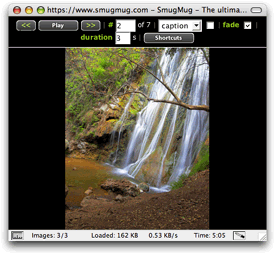 SmugMug is a four-year-old service that provides online photosharing to high-end, high-touch customers — professional and avocational photographers who care deeply about the presentation of their photographic assets. Headquartered in Mountain View, SmugMug has gotten a lot of press for its incorporation of Amazon's S3 storage service, but its model is creative on a number of levels. As a small company, its 17 employees are distributed around the US and around the world. Many of SmugMug's employees have been hired from the talent pool discovered within its own loyal customer base. And they've built a site that now supports more than 100 million photographs, all with a very small engineering team. In part, they've done this by leveraging inexpensive pieces of infrastructure (like S3) and open-source software — like YUI.
SmugMug started using YUI shortly after it was released, after it was discovered independently by MacAskill and Thompson. Says MacAskill: "When I first became aware of YUI in March or February, I said look, this is the JS Library to use. I looked at all kinds of different things. It seemed to be lean and designed in a way that made sense." The à la carte approach with its small file footprint was a big factor for MacAskill. "I'm the optimization guy. I did not want a heavy footprint for a client-side library."
Looking beyond the architecture and the code quality, SmugMug's engineers saw some other elements that were appealing. "The documentation was really good," says Jimmy. "We didn't want to dig through sparse documentation trying to figure things out. I looked at the YUI examples and I could picture immediately how this fit in the work I was doing."
One of the singular qualities of SmugMug's YUI implementation is that YUI is exposed directly to SmugMug customers. "We let customers control every pixel on the screen," MacAskill told us. "We give them all the tools they need to get exactly the result they want, including using YUI as part of their customization. That's another reason why documentation was such a high priority for us."
In the past 9 months, the team has incorporated into numerous facets of SmugMug's product:
- Accordion menus based on Animation;
- Panel-based flyouts for displaying EXIF information and phototools;
- Drag & Drop rearrangements of galleries;
- Lightbox functionality based on the Panel Control
- Rendering and adding new comments based on Connection Manager
- In-context notifications using Panels and Animation;
- Animation Utility and Dom Collection are used to manage opacity and other transitions, giving the interface a more fluid, polished feel;
- Dom Collection used throughout to manage dynamic DOM updates;
- Rich interactions underpinned by the Event Utility, including performance techniques like the use of purgeElement to stay skinny on memory;
- Use of a modified version of the Slider Control's Color Picker example in customization screens.
Pain points for SmugMuggers using YUI? "We'd like to see more DOM insertion and creation functionality, the kinds of things we saw in looking quickly at TabView in the past few days with its Element object," Thompson told us.
We're big fans of SmugMug — they joined us at Yahoo! for Hack Day late last year and their passion for geeking out, building cool stuff, and taking care of their customers is evident in everything they do. If you want to get a sense of the love they bestow on their product, go to any gallery (here's a pretty one with waterfalls) and click on the slideshow link. When the slideshow begins to play, zoom your browser window — note that the pictures scale up to fill your screen from high-resolution source. They never forget, even in the details, that this is a site for photographers and image lovers and that it's all about maximizing the experience of beautiful images.
Do you have a YUI implementation that would be of interest to the YUI community? If so, please share your link and post a message to the community forum at YDN-JavaScript, or leave us a message in the comments section below.