
Implementation Focus: Gaia Online
From a frontend engineering perspective, what are the core challenges you face in your work on Gaia Online?
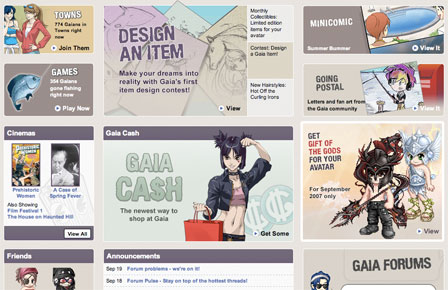
Gaia is very graphically oriented by comparison to the typical web site, with a focus on avatars and a virtual world experience. As a result, the site has a constant need for rich visualizations to convey that sense of "world". From the header down to the graphical heavy modules on the site (contest winners, featured content, upcoming events, etc), just about every piece of the page is given a graphical treatment. In many ways, our goals were directly opposed, both to build as many unique visuals into the site as possible while reusing as many elements as we could to reduce load times and ease the strain of content development. At Gaia Online, we were building a new look and feel for a site that has been around for several years. Due to the size of the site (and legacy code issues), the entire site could not be upgraded in one fell swoop. Instead, we needed to find a way to introduce UI components for the required functionality without disturbing the existing infrastructure on the site; all while letting us still plan for the interactivity and internal page refreshes slated to appear over the next several months.
What role is YUI CSS playing in your project?
YUI Reset CSS and Grids CSS were the keys to creating our layouts in such a way they looked consistent across all browsers. During our migration, we created an alternate version of the reset.css, prefixing the declarations with #gaia_content. This let us mark the body tag on pages that had been converted to use both the reset.css and Yahoo's grid system. Once we have migrated all of the, the body#id becomes obsolete and can be phased out of the document, leaving us with the pure YUI CSS.
Because of Gaia's heavy graphical nature, we also found ourselves working with pixel based constraints as opposed to the em flexibility provided by the traditional YUI grid layouts. Not wanting to lose the all the power the grid layouts gave us, we made minor adjustments to our own core.css (an override loaded in addition to the YUI Grids and Reset). In this file, we used one higher layer of specificity to change the relevant measurements from em to px. It worked perfectly out of the box:
/* adaptation of yui-t7 */
/*  */
#gaia_content{
    width:950px;
    padding:10px 9px;
    border-left:1px solid #000;
    border-right:1px solid #000;
    margin:0;
    background:#e4ded8 url(/images/gaia_global/body/shared/rs_bodygradient.gif) repeat-x top left;
}

#gaia_content.lrec_mainLanding .yui-b .yui-gb .yui-u{
    width:310px;
    margin:0 0 0 10px;
}
#gaia_content.lrec_mainLanding .yui-b .yui-gb .first{
    margin:0;
    width:200px;
}
#gaia_content.lrec_mainLanding .yui-b .yui-gb .second{
    width:420px;
}
#gaia_content.lrec_mainLanding #yui-main{
    margin:0 0 10px 0;
    height:250px;
    overflow:hidden;
}
#gaia_content.lrec_mainLanding .middle{
    margin:0 0 10px 0;
    height:260px;
    overflow:hidden;
}
(Note: In the above example, we created several variations of the yui-t7 layout by adding an additional class to div#gaia_content.)
Beyond the CSS, we found ourselves using Yahoo's markup for more than just the YUI components. To remain consistent, modules were given the typical hd/bd/ft classes which could then be overridden with ID specific CSS. For our "pure graphical" modules such as advertisements, this let us give more semantic meaning to the modules, defining themselves for browsers that were not using CSS. Without knowing how the scope of the project would change after its launch, using these core class names and consistent styles make it possible to easily implement Drag/Drop, Panel, and Menu in the future depending on how the design might evolve.
You're making use of YUI's JavaScript Core (YAHOO, Dom, Event), Utilities and UI Controls, too?
- YUI Menu Control both from HTML (primary navigation) and for the Shortcuts menu (from JS)
- Panel Control for the world map navigation and the Daily Chance rewards
- Connection Manager in the map navigation and Daily Chance
- Animation Utility in the map navigation
- Event Utility attachment in the header (menu items, map launching, Daily Chance)
- TabView Control for rotating "features" on the logged in home page
- Drag and Drop Utility in the Gaia Profiles
- YUI's Logger Utility to avoid
alert()everywhere
For a tour of Gaia's current use of YUI the YUI components listed above, check out video below (also available as a QuickTime movie):